> For the complete documentation index, see [llms.txt](https://docs.unlocks.app/llms.txt). Markdown versions of documentation pages are available by appending `.md` to page URLs; this page is available as [Markdown](https://docs.unlocks.app/features/token-page/overview.md).
# Overview
Supply details, release schedule, and the key assumptions behind our listing
## Overview
Each token tracked on Tokenomist has a dedicated page that consolidates **release schedules, allocations,** and **methodology** in one place. This shows you not only *when* tokens are released, but also *who benefits* and *how precise* the data is.
## Accessing the Token Page
The Token Page is available for every tracked asset in Tokenomist. You can access it by searching directly from the sidebar or top navigation, or by clicking into any token from features such as the [Emission Screener](/features/emission/emission-screener.md), [Allocation Screener](/features/allocation/allocation-screener.md), or [Fundraising Screener](/features/fundraising-screener.md).
Each Token Page is organized into the following modules:
1. **Emission**: Net supply changes (cliff, linear, inflation, deflation). See for how we categorize releases into cliff unlocks or linear releases at [Emission: Cliff, Linear](/methodology/emission-cliff-linear.md).
2. **Unlock Progress & Notable Events**: A snapshot of total released supply and upcoming cliff unlocks.
3. **Release Schedule**: An interactive token release chart with allocation toggles and metric overlays.
4. **Tokenomics Reference**: Source reliability via [Precisions and Assumptions](/methodology/precisions-and-assumptions.md).
{% embed url="" %}
## How to Use the Token Page
### Emission
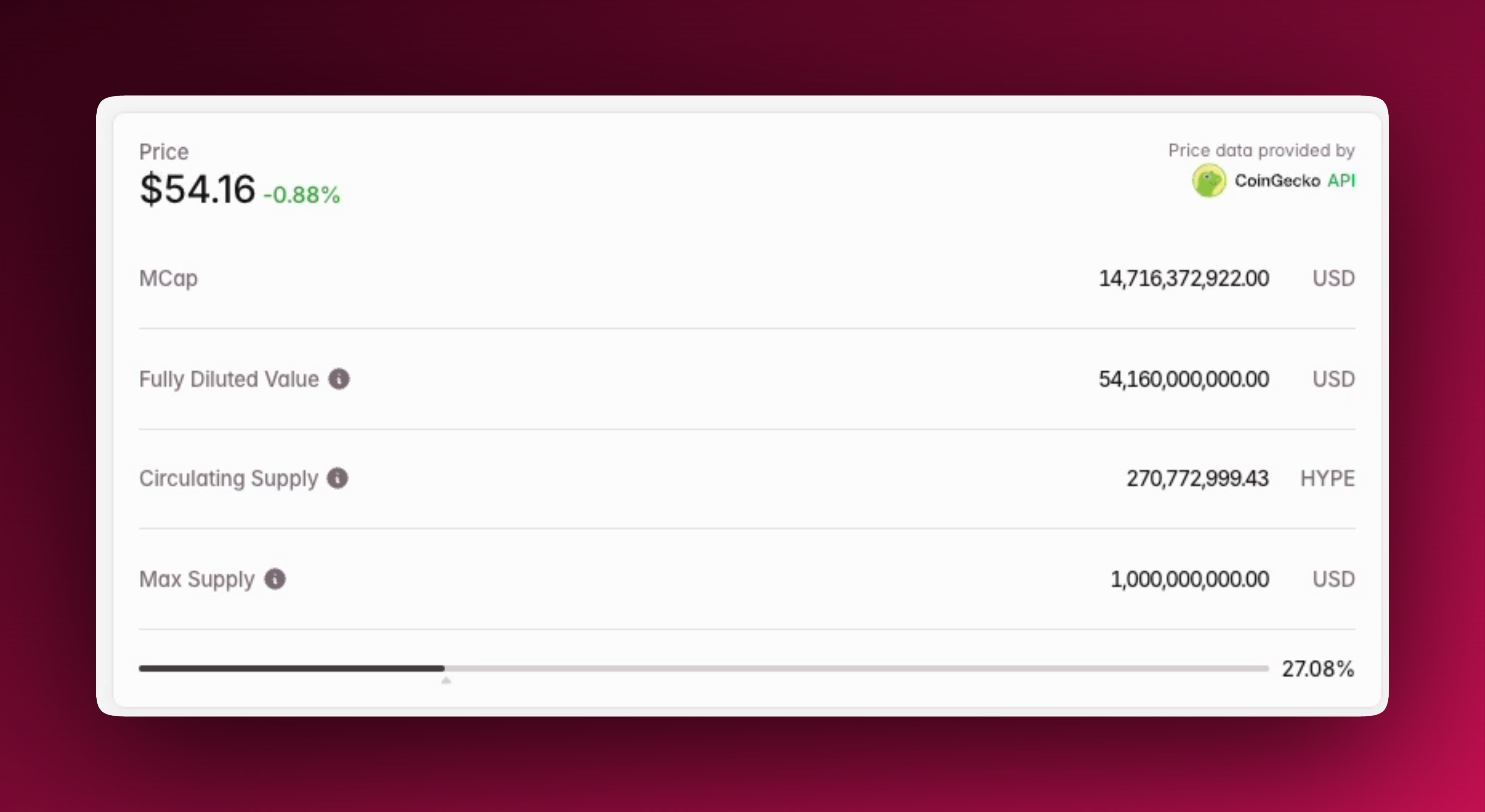
At the top of the page, you’ll see live **price, market cap, fully diluted value (FDV), circulating supply, and max supply**, sourced from [CoinGecko](https://coingecko.com). These provide the baseline context for every analysis. For more information on supply metrics, please see [Supply Metrics](/methodology/supply-metrics.md).
Beside that is the emission component, which standardizes all supply changes into
* **Inflation**: all positive supply emission from cliff unlocks and linear releases.
* **Deflation**: all negative supply decreases from mechanisms such as burn.
* **Emission**: the difference between inflation and deflation in the timeframe.
Emissions can be projected across multiple horizons, which include +1D, +7D, +1M, **+6M** :square-web-awesome-stroke:**, +1Y** :square-web-awesome-stroke:**, +4Y** :square-web-awesome-stroke:**.** By default, the timeframe is set to **All**, which is all **historical** **emissions**.
{% embed url="" %}
### Unlock Progress & Events
The unlock widget shows **total supply status**, i.e., how much of the token’s supply is Unlocked, TBD Locked (see [TBD Locked](/methodology/tbd-locked.md)), Unlocked, or Untracked.
To the right of that, the **Notable Cliff Unlocks** carousel shows 3 historical and 1 upcoming cliff unlock events (or up to **10 historical cliff unlock events and 5 upcoming cliff unlock events with Pro** :square-web-awesome-stroke:), excluding mining emissions.
{% embed url="" %}
These components can be used to gauge the current status of token release progress and any important upcoming release events at a glance.
### Release Schedule
The **Release Schedule** shows how supply enters circulation over time, with interactive tools to customize the view.
{% embed url="" %}
On the left, allocations can be toggled individually or regrouped into [Standard Allocations](/methodology/standard-allocations.md) for cross-project comparison. Both the chart and the allocation table update instantly, and **Pro** users can export the full dataset as **CSV** :square-web-awesome-stroke:.
The chart offers multiple controls:
* **Modes**: Cumulative stacked (default) or a non-cumulative bar chart
* **Timeframes**: the last 7D, 1M, 1Y, or All for the entire historical and projected view
* **Resolution**: Monthly, **Weekly** :square-web-awesome-stroke:**, Daily** :square-web-awesome-stroke:
Striped bars highlight **TBD allocations**, making uncertain supply visible. If projects later define these, updates are recorded in the **Historical Changes** panel. See [TBD Locked](/methodology/tbd-locked.md) for more information.
{% embed url="" %}
For additional context, you can click **Add Metric** to overlay additional metrics such as additional price pairs and metrics. **Pro** users can also overlay **Total Claimed Supply** :square-web-awesome-stroke:, **Total Unlocked Supply** :square-web-awesome-stroke:, and **Burn** :square-web-awesome-stroke: for applicable tokens, connecting release schedules to on-chain and market behavior.
{% embed url="" %}
### Tokenomics Reference
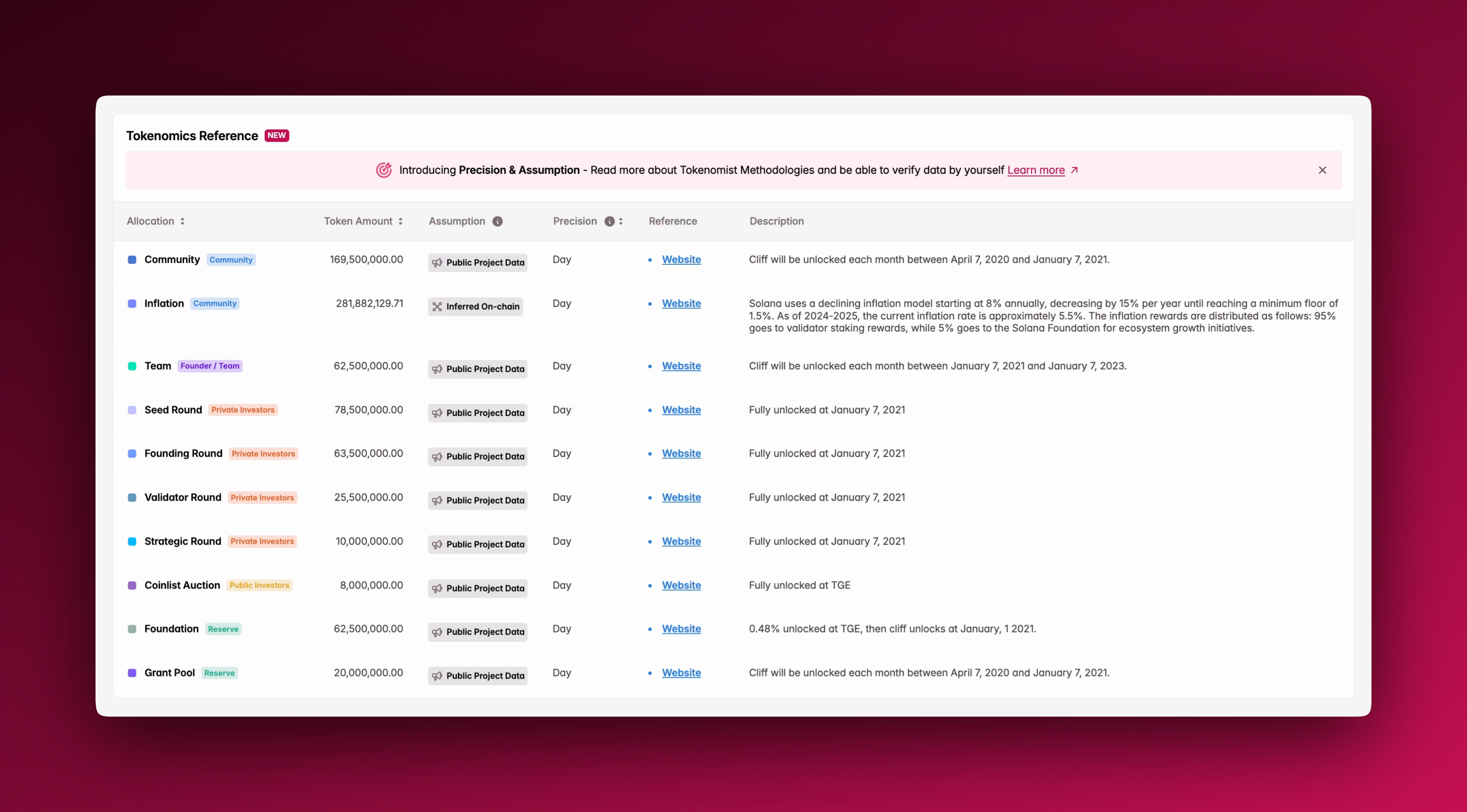
At the bottom of every token page, allocations are listed with two important tags: **Assumption** and **Precision**. Together, these form our **Precision & Assumption framework**, which helps you quickly judge how reliable each piece of tokenomics data is.
**Assumptions** show *where the release data originates*. **Precision** indicates *how exact the timing is*. This framework ensures that you aren’t just seeing *what* is set to unlock, but also *how much confidence* you should have in that information.
Learn more at [Precisions and Assumptions](/methodology/precisions-and-assumptions.md).
## Why It Matters
The Token Page combines every aspect of supply analysis into one standardized view. This makes it easier to evaluate dilution risk, investor incentives, and long-term sustainability, all in one place.
## Where To Next?
* Check out the remaining features of the token page: [Tokenomics](/features/token-page/tokenomics.md), [Unlock Events](/features/token-page/unlock-events.md), [Token Competitors](/features/token-page/token-competitors.md), [Fundraising](/features/token-page/fundraising.md), [On-Chain Claims](/features/on-chain-claims.md), and [Updates](/features/updates.md).
* Learn more about our [Token Listing Process](/methodology/token-listing-process.md).
* See our methodology for [Non-Traditional Unlock Mechanisms](/methodology/non-traditional-unlock-mechanisms.md), [Precisions and Assumptions](/methodology/precisions-and-assumptions.md), [TBD Locked](/methodology/tbd-locked.md), and [Standard Allocations](/methodology/standard-allocations.md).